Put the four fingers of your left hand on A, S, D, F and the four fingers of your right hand on J, K, L and the semicolon, with both thumbs resting on the space bar. This is the home row — the position every movement starts from and returns to. You find it without looking: the F and J keys carry small bumps under the index fingers, and once those two are in place the other six land by themselves.
That is the whole answer to “where do my fingers go”. The rest of this page is about the part that actually decides whether typing becomes fast: why this particular arrangement works, and which of its details carry the weight.
The position is found by touch, not by sight
The bumps on F and J exist for exactly one purpose: taking the home position blind. Lower your hands, feel for the two ridges with your index fingers, let the rest settle. Done ten times, this stops being a search and becomes a single motion — and it is worth making automatic before any letters, because every other skill is measured from this point. A hand that cannot find home without looking has nothing to measure its movements from.
Which finger presses which key
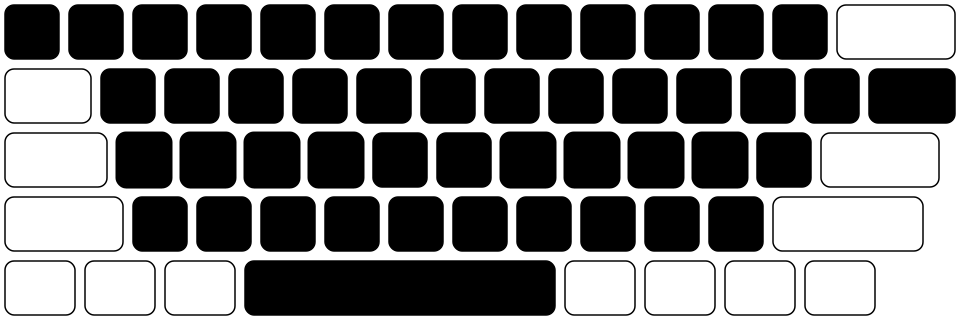
Each finger owns a slanted column of keys and nothing else. The index fingers work double shifts — each covers two columns (F with R, V, and the reach to G, T, B for the left; J with U, M and the reach to H, Y, N for the right). Middle and ring fingers take one column each. The pinkies cover the outer columns plus the service keys at the edges. Thumbs press the space bar — one of them, whichever feels natural; it stays the same from then on.
On an ordinary keyboard the rows are offset sideways, so the left wrist sits at a slight angle to its columns. Some experienced typists re-map the left bottom row to neighbouring fingers to straighten that angle. It is a legitimate refinement, worth trying only once the basic skill exists.
What actually makes it fast
Motion-capture research at Aalto University compared trained touch typists with fast self-taught typists and found that the number of fingers does not predict speed. Three things do: every key is always pressed by the same finger, the next movement starts preparing while the current one is still in flight, and the hand itself stays still while the fingers travel.
The home position is valuable precisely because it hands you all three at once. Fixed columns give every key exactly one finger. A resting position gives the next finger a known launch point, so preparation is possible. And an anchored hand moves fingers, not the whole arm. A self-taught typist can arrive at the same three properties by their own long road; the home row is simply the shortest known path to them.
The return matters more than the reach
Every keystroke is a round trip: from the home key to the target and back. The return is the half people skip — the finger stays where it landed, the hand drifts, and the next movement starts from a random point that no amount of practice can make familiar.
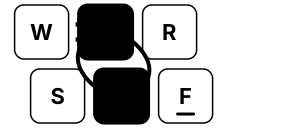
While the finger is away from home, its address map is suspended; the moment it returns, every distance is known again. This is why the return deserves to be practised as the second half of the movement — and why this trainer draws the path there and back.
Pinkies and the service keys
The pinkies are the weakest fingers, and the keyboard gives the right one the busiest service keys: Enter, Backspace and a Shift. Two habits keep this fair. Take Shift with the hand opposite to the letter — a capital A wants the right Shift, a capital J wants the left — so one hand holds while the other presses.

And keep the pinkies relaxed: a tense, splayed little finger misses more often than a lazy one. If yours tire quickly at first, that is normal and passes; patient, short practice serves them better than any stretching.
Two alphabets, one geometry
ФЫВА—ОЛДЖ and ASDF—JKL; are the same eight physical keys, the same bumps, the same columns and the same movements. The home position is learned once and works for both layouts; what differs between languages is which letter a movement produces, not the movement itself. If you type in two languages, this is good news: the foundation transfers whole.