Touch typing looks like knowledge: which letter sits where. But a person who types without looking does not recall the layout — they do not hold it in mind at all. Ask them what is to the right of “p” and they will answer only after typing a word in their head. The knowledge lives in the hand, not in memory: the thought of a letter becomes a movement, skipping recall entirely.
Which means learning the keyboard and learning to type without looking are two different tasks. The first takes an evening. The second takes practice in which every movement is repeated enough times to stop needing attention.
Why highlighting the key gets in the way
Most trainers draw a keyboard on screen and light up the key you need. The reasoning is fair: you don't know where the letter is, so here it is.
The problem is what you learn while doing that. Your eyes go to the on-screen keyboard, find the highlighted rectangle, and the finger follows the picture. A skill does form — just not the one you wanted. It is the skill of searching a diagram quickly, and it has a ceiling: checking with your eyes costs time that no amount of practice removes.
Worse, that skill blocks the next one. While the hint is on screen, the hand has no reason to remember the movement — the picture remembers for it. Removing the hint later hurts: speed drops, and most people put it back.
How it was taught before screens
Typing schools in the 1970s had no screens and the same problem to solve. Their answer: the learner said every keystroke out loud. “Right hand, index finger, up” — and only then pressed.
It sounds absurd, but behind it stands Pyotr Galperin's theory of the stepwise formation of mental actions. In short: for an action to become automatic, it is first unfolded in full, in an external, observable form. The spoken command is that unfolded action. With repetition it collapses — first the speech goes silent, then it disappears, and pure movement remains. Speed arrives on its own, as a consequence of that collapse.
The point is what gets unfolded: the movement, not the location of the key. Learners did not say “the letter E is in the top row” — they said which finger went where.
The same command, given to the eyes
Nobody is going to narrate keystrokes at their desk. But the same unfolded command can be given to sight instead of hearing — by drawing the path of the finger: where it starts, where it goes, where it returns.
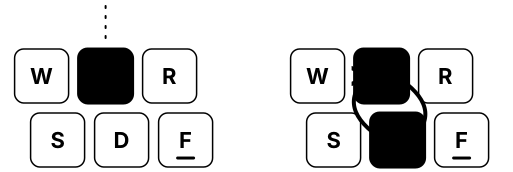
That is what FlowTyping does. There is no highlighted key to find; there is an arc from the finger's home key to the target and back. The eye reads a movement, not an address. Once the movement has been repeated enough, the arc stops being needed — the hand arrives ahead of it.
Home is the anchor
Every movement is measured from the home position: index, middle, ring and little fingers rest on the middle row (ASDF — JKL; in English, ФЫВА — ОЛДЖ in Russian), thumbs on the space bar.
Home exists for one reason: it gives the hand a reference point it can find by touch, without looking. As long as the hand knows where it is, any movement is a short vector from a known place. Lose home, and you are searching for the key again — which means looking down.
That is why every keystroke in practice ends with a return: the finger leaves, presses, comes back. The return is half of the exercise, not a formality.
Accuracy goes before speed
A wrong movement is remembered exactly as well as a right one. The hand does not distinguish “correct” from “incorrect” repetitions — it consolidates what was actually done. A mistake repeated a hundred times becomes an automatism too, and then needs unlearning of its own.
Hence a conclusion many find counterintuitive: don't push the pace. Speed is not the goal of practice, it is its by-product. The goal is clean repetitions. A movement that is correct and even speeds up by itself, because a collapsed action is faster than an unfolded one; forcing it earlier only produces misses.
In FlowTyping the cursor waits for the right character and does not let you past. There are no penalties and no error limits; the waiting cursor simply keeps a wrong movement from happening at all.
Rhythm matters more than bursts
An even tempo is the sign that a movement has become automatic. While the hand is still thinking, the intervals jump around: short on familiar letters, long on the ones being recalled. As automatism sets in, the spread narrows.
So a quiet rhythm channel runs under the typing line. It shows evenness, not speed. You can type faster in bursts, but a burst is a movement that isn't ready yet.
How long it takes
Honestly: longer than headlines promise. The first weeks go into getting your hands to stop hunting for keys; confident speed takes months of practice. The good news is that the practice should be short — one or two sessions a day of a few minutes work better than an hour once a week. Motor skills consolidate through repetitions spread across days, not through volume in one sitting.
Session length is a setting, from one minute to fifteen. A minute is enough to keep the day from being a blank.
If you already type your own way
Almost everyone who types a lot has invented a personal method — two fingers, four, six, with glances down. It works and reaches a decent speed. Moving to touch typing will temporarily lower it: the old habit interferes with the new one, and for a while you will type slower than you can.
That dip is unavoidable in any change of motor habit, and it is limited in time. You go through it once. The only thing that makes it longer is switching back and forth — reverting to the old way whenever a deadline presses. Then neither habit finishes forming.
Where practice starts
You don't choose the order of letters. Everyone starts the same way: index fingers and the space bar — the strongest and most precise fingers, where any hand placement begins. The next group of keys opens when the previous ones start landing on the first press without hesitation: the trainer watches first-press accuracy and reaction time for each character separately.
So the set of letters grows around you rather than on a course schedule. Layout, hand placement, theme and session length live in settings, and can be changed at any time.